One of the things I recommended when I got involved with the project was tracking user behavior in the app. I suggested using Hotjar.
The user cycle was about two weeks. Every two weeks, a survey was sent out and a report was created, and users would log in to view the report during that period. The exact timing varied by user, but it was safe to assume that most users would interact with the system within a two-week window, giving us a good amount of behavior to analyze.
Since I wanted to understand how different types of users — schools, districts, and analysts — were using the app, I went through session recordings looking for common patterns.
One thing stood out.
There was a page where users could add a bonus question to the next week's survey. In some accounts, the button for adding a bonus question was grayed out. But there was still an active “Create bonus question” button.
Clicking it allowed users to create and save a question, but the question couldn't actually be added to the survey. There was no explanation as to why.
So users would create a question, try to add it to the survey, and get frustrated when nothing happened. Some would repeat the process several times, getting the same result.
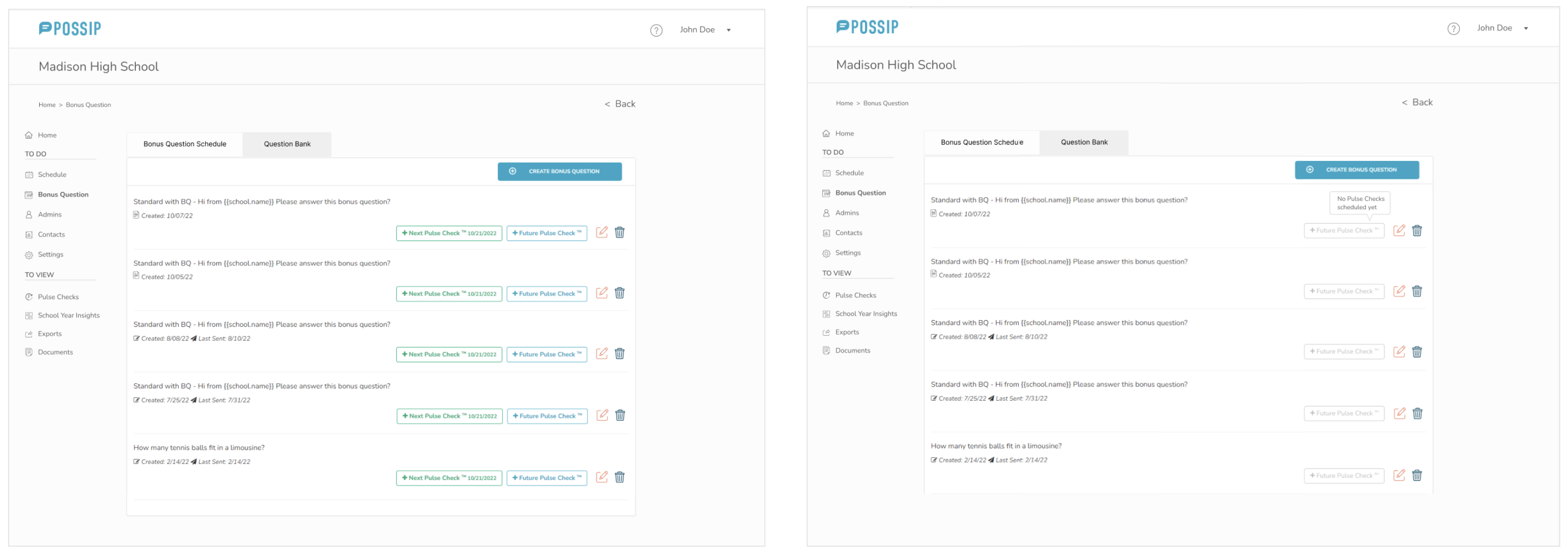
I added a hover state to the disabled button explaining why it wasn't available: “No pulse checks scheduled yet.”
While manually testing the platform, I also noticed another problem: once a question had been submitted for a survey, there was no way to edit or remove it. The only option was to contact customer service.
I added Edit and Trash icons next to the questions, giving users more control over their actions. I also added a confirmation message after submitting a question, asking users if they were sure they wanted to proceed. This helped prevent accidental submissions and gave users a chance to catch mistakes.
None of this was part of the original scope.
I found these problems while testing the platform and watching session recordings. The solutions were relatively simple, and I had some downtime while waiting for customer feedback. So instead of waiting, I used that time to fix problems I could already see.
Sometimes the best UX improvements are the ones you discover along the way.